

B2B customer portals
The portal accounts actually adopt because it runs their business too.
Most business to business portals sit empty because they only serve the seller. McQuays gives your customers what they have been asking for: included AI tools to automate their sales, triage their inbox, run customer service, and handle procurement. They log in to run their business, and ordering from you happens in the same place.
What they see when they log in
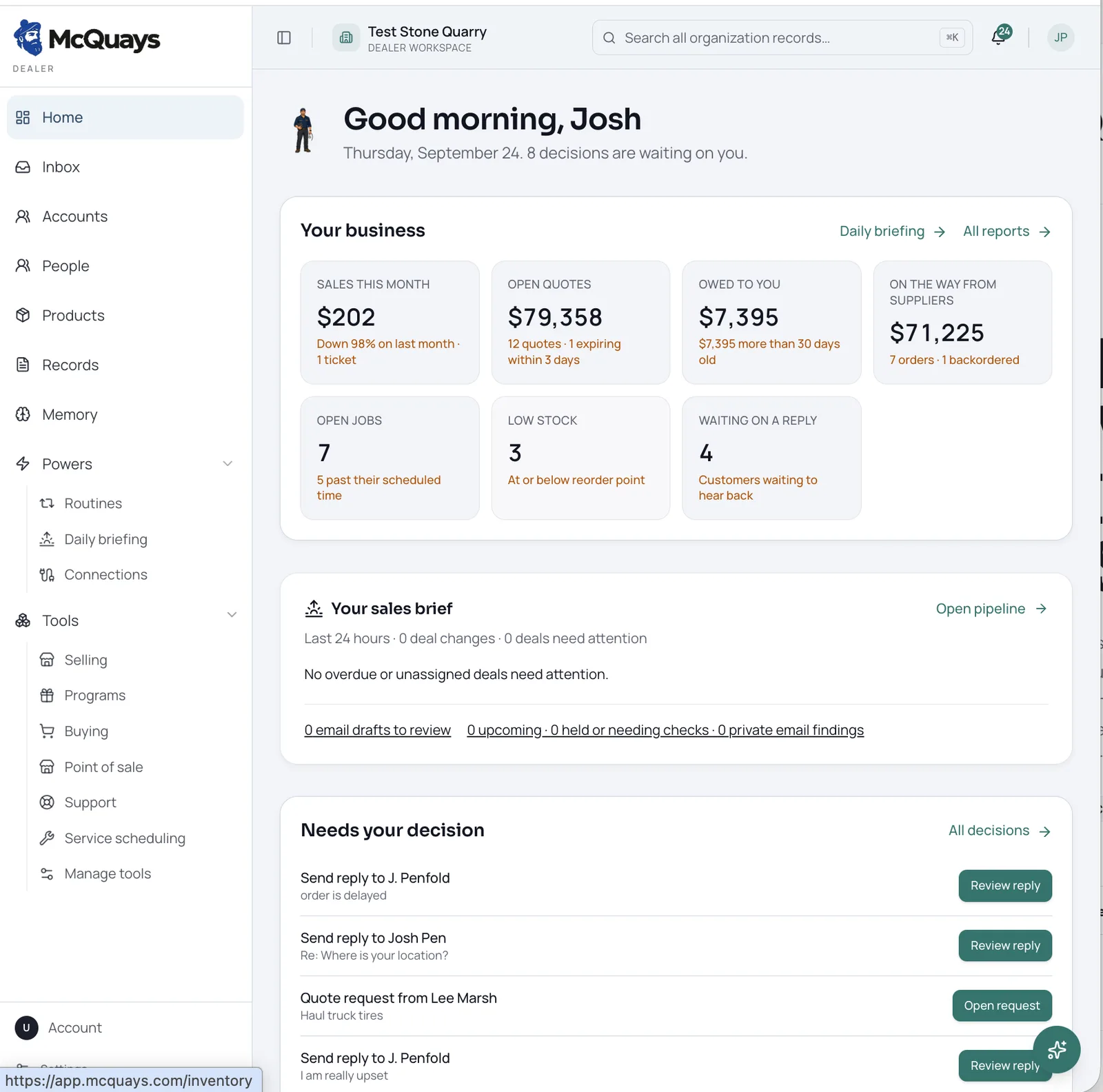 Demo data
Sales, open quotes, money owed, supplier orders, and the decisions waiting on them. This is why the portal becomes part of their day.
Included with their login
The AI tools your customers have been asking for.
Every account you invite gets these included. That is why they log in, and why the ordering side of the portal finally gets used.
Sales automation
The assistant drafts their outgoing quotes, applies the right pricing, tracks expirations, and chases follow ups so their team quotes faster.
Customer service agents
Built in agents answer the repeat questions their own customers ask. Order status, quote lookups, service scheduling, all with a person able to step in.
Inbox management
Quote requests, purchase orders, and parts questions are pulled out of email and turned into sorted work waiting for review.
Procurement tools
Reordering, backorder tracking, fitment and spec lookups, and purchase orders across the vendors they buy from.
The difference
A portal that works for both sides.
The usual approach
The usual vendor portal
- Another login that only benefits the seller.
- Customers still email their rep because the portal does nothing for their day.
- No order status, no proof of delivery, no invoice history.
- Contract pricing lives somewhere the site cannot see.
How we build it
The McQuays model
- Your account gets AI automation included with their login.
- They run their sales, inbox, service, and buying in the same place.
- Orders, deliveries, invoices, claims, and equipment in one login.
- Reordering from you is one click because the history is already there.
Replacing a web store
Why traditional B2B ecommerce sits empty.
Older business to business web stores were built as a catalog with a checkout. Trade customers do not shop. They service equipment, reorder for a job, approve a quote, and reconcile a purchase order. That is the work McQuays puts in front of them.
What the buyer gets
Legacy B2B web store
A place to key in their own orders. The work moves from your counter to their desk, and nothing comes back to them.
McQuays portal
AI sales automation, customer service agents, inbox triage, and procurement tools included with their login, so the portal saves them time.
How an order happens
Legacy B2B web store
Search a catalog of thousands of parts, add to cart, check out, and hope the price and stock are right.
McQuays portal
Reorder from a past order, an invoice line, a quote approval, or the equipment record the part was fitted to.
Why they log in
Legacy B2B web store
Only when they have to, which is why most accounts go back to calling and emailing their rep.
McQuays portal
Every morning, because their own sales, inbox, service requests, and buying run there.
Behind the counter
Legacy B2B web store
A separate storefront bolted onto the back office, with syncing, rekeying, and pricing that drifts.
McQuays portal
Portal orders land in the same queue as counter, phone, and email orders. One record, no second system.
Who else is on it
Legacy B2B web store
Your customers only. Your suppliers stay in email and spreadsheets.
McQuays portal
Customers, suppliers, and your team on the same records, so purchase orders and claim paperwork move in one place.
If you already run a web store, you can keep selling the way you sell today and move accounts over as they are ready. Nothing has to be switched off on day one.
What is in the portal
Six things your accounts can do without calling you.
Order and delivery status
Open orders, backorders, ship dates, tracking, and signed proof of delivery without calling the counter.
Invoices and statements
Invoice and credit memo copies, open balances, statements, and payment by card or bank transfer on their terms.
Quotes and contract pricing
Requests come in through the portal, quotes come back at the customer's agreed pricing, and approval turns a quote into an order.
Warranty and service requests
Customers submit claims and service requests with photos and documents attached, then watch the status change.
Their equipment and history
What they bought, what is fitted where, and what was serviced when. The portal shows their operation, not just your catalog.
Multiple users and approvals
Site staff request, purchasing approves, accounting pays. Each person sees what belongs to their job, with purchase order numbers captured.
Ordering
Then buying is the easy part.
Once a customer can see their history, their equipment, and their pricing, ordering is a short step rather than a separate website.
- Reorder from any past order or invoice line.
- Customer specific pricing, contracts, and tiers applied automatically.
- Purchase order numbers, ship to locations, and job references captured on the order.
- Stock and availability shown before the order is placed.
- Orders land in the same queue as counter, phone, and email orders.
- Approval rules you set, so nothing unusual ships without a person looking at it.
Both sides of your business
Customers and suppliers in the same portal.
Your customers
Accounts, job sites, and fleets get self service for the things they call you about most.
Your suppliers
Purchase orders, confirmations, backorders, and claim documentation move in the same place as everything else.
Your team
Every portal action lands in McQuays as a real record. Nobody rekeys anything from a separate storefront.
When your customers and your suppliers work in the same place you do, the portal stops being a website you maintain and starts being how the relationship runs.
With the assistant
Answers in plain language, inside the portal.
Customers can ask for what they need instead of learning your menu structure. The assistant pulls from their own records only, and anything that changes an order, a price, or a claim waits for your team to approve it.
Show me everything still open on the Henderson job.
Send me the invoice copies for last month.
Reorder what we bought in August for the loader.
Demo data
Getting started
Open it to a few accounts first.
01
Connect your data
Customers, pricing, orders, and invoices are mirrored from what you already run. Nothing gets replaced.
02
Invite a handful of accounts
Start with the customers who call most. They get self service for the questions they ask every week.
03
Turn on ordering
Once the account information is right, ordering goes live with their pricing and your approval rules.